Home / Integrations / Xero
Connect Xero to HubSpot so your sales and account teams can see invoices and payments on every customer record, and finance stops retyping deals. We set it up, test it with your real invoices and make sure both teams trust the numbers.







Sounds familiar?
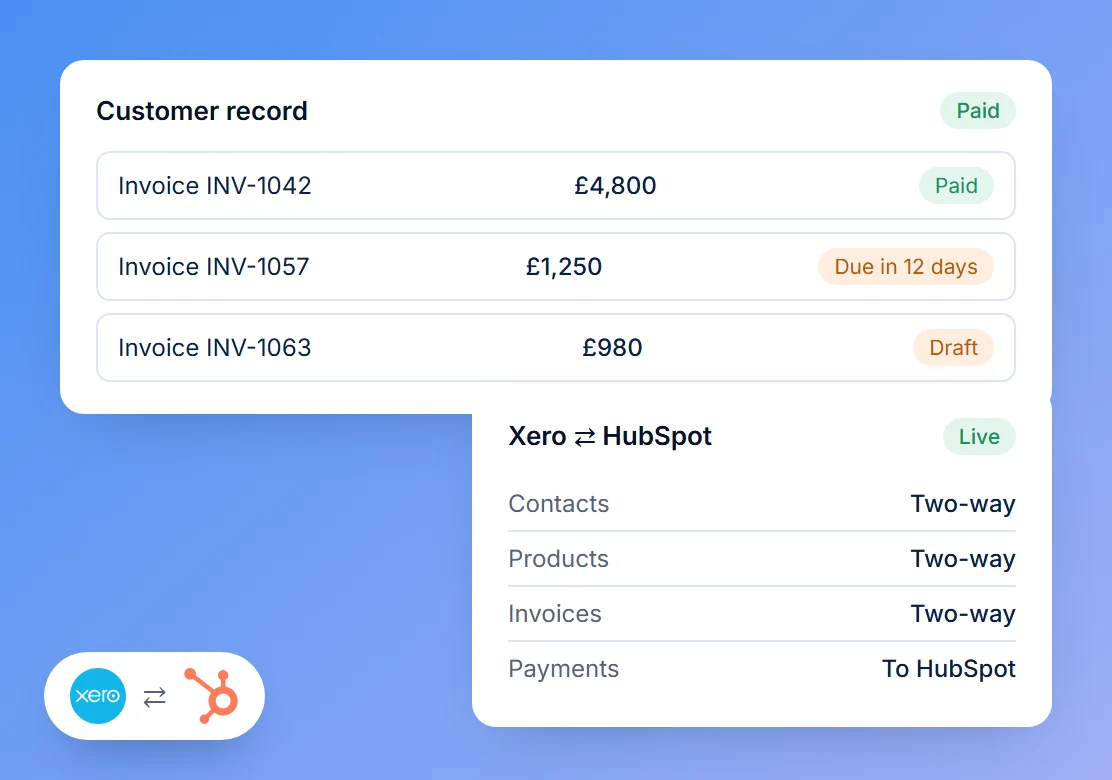
Invoices and payments from Xero show on the contact, company and deal in HubSpot, so nobody has to ask finance.
Won deals or quotes become invoices, with the right customer, products and tax rates, without copying anything by hand.
Payment status updates in HubSpot automatically, and can trigger the next step, like a thank-you email or a renewal task.
We agree which system is the source of truth for each field, then build reports both teams can trust.
What syncs between Xero and HubSpot
We agree with your finance team what moves, in which direction, and which system wins. Then we connect them in the way that suits your setup.
One-way or two-way
Contacts
Your Xero customers and HubSpot contacts matched, so every invoice lands on the right record.
One-way or two-way
Products
Xero items and HubSpot products kept in step, with prices and codes that match.
Into HubSpot or both ways
Invoices
Invoices on the contact, company and deal, and invoices raised from HubSpot deals or quotes.
Into HubSpot or both ways
Payments
What's paid and what's outstanding, visible to sales and account managers.
What's included
Every project starts with how your sales and finance teams work today. The rest depends on what you need, and we agree it with you up front.
Always included
Review of both systems
Your Xero contacts, items and invoices, and your HubSpot deals, products and properties.
Sync rules
What syncs, in which direction, and which system wins for each field, agreed with finance.
Field mapping
Customers, products, tax rates and invoice fields matched so nothing lands in the wrong place.
Testing with real invoices
A run with a sample of real invoices and payments, checked by you before it goes live.
Added when you need it
Scoped and priced as part of your proposal
Deal to invoice workflow
Won deals or quotes turned into invoices, with approval steps if finance wants them.
Payment follow-up
Workflows that act when an invoice is paid or overdue.
Past invoices
Invoices and payments from before the connection imported, as only new activity syncs by default.
Revenue reporting
Dashboards for invoiced and paid revenue by customer, product and owner.
Other tools
Extra steps between Xero, HubSpot and the rest of your tools, such as a Slack alert when a large invoice is paid.
Team training
A short session for sales and finance on where to find things and what not to edit.
Why choose Pineo

Will Andrew
Founder

Claudia Cadete
Senior HubSpot Architect
Senior-led, start to finish
No hand-offs. HubSpot admins since 2017, with 20 years of combined HubSpot experience between us.
Fixed, published prices
You know the cost before we start. Every project is quoted as a fixed price after a 30-minute call.
Your data, handled properly
Registered with the ICO, everyone on our team has signed an NDA, and client logins are kept in 1Password.
ICO registration ZB789502
Proven and certified
HubSpot and Zapier Platinum Partner, rated 5.0 on HubSpot’s partner directory.


Xero integration pricing
A fixed price for your Xero integration, confirmed once we've seen how you invoice today.
Starting point
Xero and HubSpot integration
Contacts, products, invoices and payments synced between Xero and HubSpot, with the rules agreed with your finance team and tested on your real invoices.
from
£550
one-off, fixed price
Extras such as invoice automation, a revenue dashboard or importing past invoices are scoped and priced in your proposal. All prices exclude VAT. HubSpot and Xero subscriptions are billed by them.
Xero connected in four steps
Review both systems
We look at how you invoice today and what sales needs to see, then recommend how to connect them.
Fixed-price plan
A written plan with the sync rules, field map, dates and a fixed price.
Build and test
We connect the systems in the agreed order and test with real invoices and payments.
Go live and train
We switch it on, watch the first syncs and show both teams how it works.
How teams use Xero and HubSpot together
Start with the simple wins and build up from there. A few of the ways businesses connect the two, from quick setups to more advanced ones.
Sales and account managers see invoice and payment status on the customer record before they pick up the phone.
New customers set up in HubSpot appear in Xero with the right details, so finance doesn't create them twice.
The same products and prices in both systems, so quotes and invoices always match.
When a deal is won, an invoice is raised in Xero with the right customer, products and tax rates, ready for finance to approve.
Overdue invoices create a task for the account owner, and paid invoices start onboarding or renewal steps automatically.
Invoiced and paid revenue by customer, product and sales rep, next to your pipeline, so forecasts and actuals sit together.

Fani Petrova
Integration Specialist, User Guest
“Will stepped in during our onboarding, quickly understood our needs, and got things on track. He became a go-to for our CS team and helped us hit key priorities fast.”

Adam Horne
Head of eCommerce, Frive
“The migration into one HubSpot account went a lot more smoothly than we expected. We didn't lose a single working day, and by Monday morning it just worked.”

Sivvy Mikitsey
GTM Lead, Octopus Energy
Free HubSpot audit
Is your HubSpot ready for AI?
In 30 minutes we review your data, pipelines and workflows, then give you a health score and prioritised fixes. You keep the findings either way.
Questions about Xero and HubSpot
Does HubSpot integrate with Xero?
Can we create Xero invoices from HubSpot deals?
Will our old invoices come across?
Do we need a particular HubSpot plan?
Can you connect Xero with our other tools too?
Will it change anything in Xero?


